















 Offroader V5
Fill the form and submit.









Offroader V5
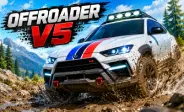
Offroader V5 is a 3D driving game with large maps to explore. You can drive through two cities and a wide countryside area without following fixed tracks. Choose from cars, trucks, off-road vehicles, and buses. Each vehicle feels different on the road. The game also has realistic physics and car damage. You can repair your vehicle after crashes and change the camera view. For another driving challenge, try Drift Boss and enjoy simple drifting action.
Explore Three Large Maps
Offroader V5 gives you three open-world areas to discover. Two maps are city-based, while the third takes you into the countryside. You can drive through narrow streets, explore different roads, or leave the city and travel across open land. Each map gives you a different place to test your driving skills. Players who enjoy large driving areas may also enjoy Car Simulator, which offers various maps and vehicles to explore.
Drive Different Types of Vehicles
- Cars: Drive normal cars on city roads and enjoy everyday driving.
- Trucks: Use heavy trucks for a bigger and more powerful driving experience.
- Off-Road Vehicles: Take off-road vehicles across rough paths, fields, and uneven land.
- Buses: Drive a large bus and explore the maps differently.
- Different Vehicle Models: Switch between vehicles to experience different sizes, handling, and driving styles.
If you prefer two-wheel driving instead of cars and trucks, MX OffRoad Mountain Bike offers rough mountain tracks, jumps, and tough terrain.
Realistic Driving Physics
The vehicles use physics that make driving feel more natural. Turning, braking, crashes, and quick changes in direction can affect your vehicle. This makes driving more fun because you need to control your speed and movement. Driving too fast can also cause bigger crashes if you lose control.
For players who want to focus on controlled slides and car handling, Drift Hunters Pro offers a different driving experience with drifting and car customization.
Test the Damage System
Crashing is part of the fun in this driving simulator. Your vehicle can get damaged when you hit objects or other vehicles. The damage does not end the game. It becomes another part of your driving experience. Use the R key to repair your vehicle and get back on the road.
Try different speeds and driving angles to see how your vehicle reacts to crashes. Learning to control your car can help you avoid extra damage while exploring.
Create Your Own Challenges
There are no strict missions that force you to follow one path. You can make your own goals while playing. Try reaching a hard-to-reach area, driving across the countryside, or bringing several vehicles together. You can even create large crashes and watch how the vehicles react.
You can also make driving challenges by choosing a vehicle and trying to finish a difficult route without crashing. This makes each game session feel different, even when you return to the same map.
Simple Driving Controls
- Arrow Keys: Drive and control the vehicle.
- Space: Use the handbrake.
- C: Change the camera view.
- 1: Select the previous vehicle.
- 2: Select the next vehicle.
- R: Repair the damaged vehicle.
- T: Activate slow motion.
- P: Pause the game.
- Enter: Reset the vehicle.
- E: Eject the payload.
- ESC: Return to the menu.
- H: Hide the instructions.
More Driving Games to Try
-
Drift Boss: Enjoy quick and simple drifting challenges with easy controls.
-
Drift Hunters Pro: Practice drifting, improve car control, and customize your cars.
-
Car Simulator: Explore different maps and enjoy a free-driving experience with cars.
-
MX OffRoad Mountain Bike: Ride through rough mountain paths, jumps, and tough outdoor tracks.
-
Try Different Driving Styles: Each game gives you a different way to enjoy driving, racing, drifting, or off-road action.